Passwords in Hybrid Identity : What Changes When AD meets Microsoft Entra ID

Passwords in Hybrid Identity
What really changes when Active Directory meets Microsoft Entra ID
When an organization moves from a traditional on-premises Active Directory Domain Services (AD DS) model to a hybrid identity architecture with Microsoft Entra ID and Microsoft Entra Connect, password behavior becomes more nuanced. In a classic domain-joined environment, AD DS is the authority for password validation, password age, reset state, and “must change at next logon.” In a hybrid environment, the same user may sign in from a Microsoft Entra joined device, authenticate to Microsoft 365 through Microsoft Entra ID, and only occasionally access on-premises resources over VPN or private connectivity. Password state stops being a single-system concern and becomes an identity-flow concern.
This article explains what changes, what does not, and how administrators should handle password operations in a hybrid identity organization. The focus is on the scenarios that generate the most confusion in real deployments: on-premises password expiration, Microsoft Entra joined device sign-in, helpdesk password resets, the “user must change password at next logon” flag in AD, password writeback, and the operating model administrators should adopt to keep the experience consistent.
1. The on-premises baseline: one authority, one enforcement point
In a traditional AD-only organization, password management is straightforward because AD DS is both the source of authority and the enforcement point for password state. If the user’s password is expired, the domain controller knows it. If helpdesk resets the password and checks “User must change password at next logon,” AD enforces that at the next sign-in path where AD validates the credential. There is no second identity plane trying to interpret, synchronize, or overlay policy on top of the same user object.
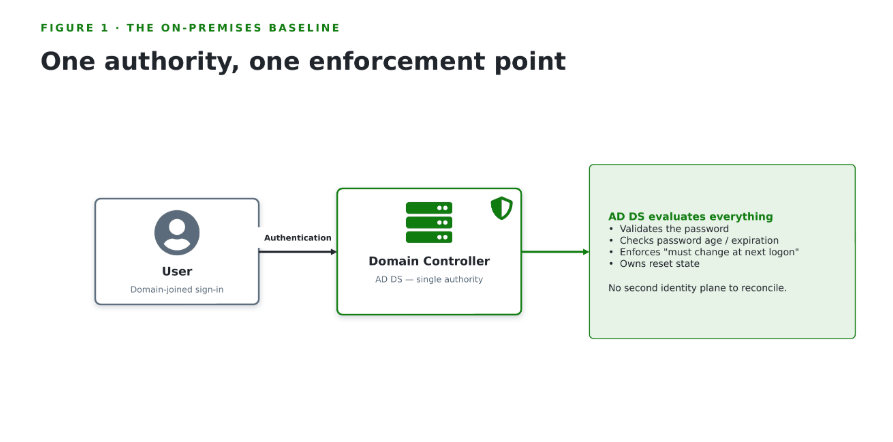
Figure 1. In a pure on-premises model, the domain controller is the single authority for password validation, expiration, and the “must change at next logon” state.
2. What hybrid identity changes
When Microsoft Entra Connect is introduced, identities from AD DS are synchronized into Microsoft Entra ID. One common authentication pattern is Password Hash Synchronization (PHS). Password sync runs much more frequently than ordinary directory object synchronization — typically every two minutes — and when a user changes the password on-premises, the updated password usually reaches Microsoft Entra within minutes.
But here is the key point many admins miss: synchronizing the password hash is not the same as synchronizing every password-related state or every password-policy decision. Password sync gives Microsoft Entra ID a cloud-side verifier for authentication, but it does not automatically make cloud sign-in enforce on-premises password expiration or honor every classic AD sign-in flag in the same way by default.
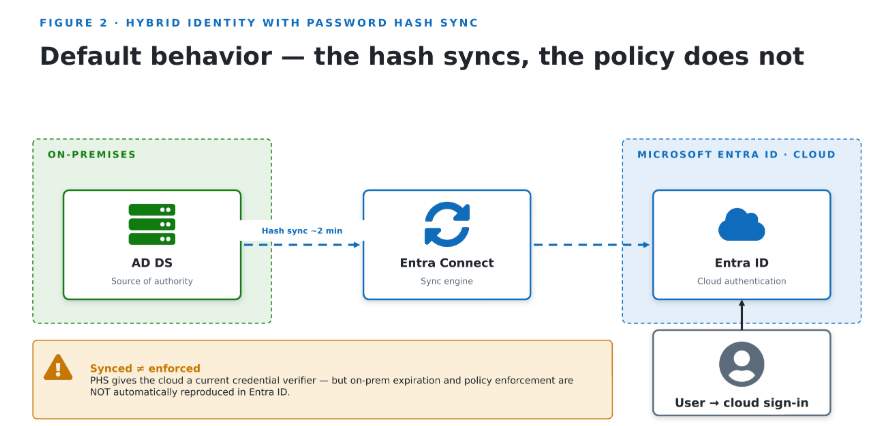
Figure 2. Password hash sync keeps a cloud credential verifier current (about every two minutes) — but it does not automatically create parity of password-policy enforcement.
3. Microsoft Entra joined devices change the sign-in path
A Microsoft Entra joined Windows device is not joined to AD DS. Users sign in with a Microsoft Entra account, and Windows obtains a Primary Refresh Token (PRT) to enable single sign-on to Microsoft 365 and other Microsoft Entra-backed resources. The device sign-in path is fundamentally modern-cloud authentication, not traditional domain logon.
In hybrid organizations, Microsoft Entra joined devices can still access on-premises resources: when on-premises identity attributes are synchronized, Microsoft Entra can provide the device with the information needed for Windows to enable Kerberos and NTLM for on-premises access. However, that on-premises SSO scenario still requires line-of-sight to domain controllers or a VPN path; the device remains Microsoft Entra joined and does not become a classic AD-joined workstation.
4. The on-premises password expires, but the user signs in on a Microsoft Entra joined device
This is the scenario that surprises most administrators. With Password Hash Sync, a user can often continue to sign in to cloud services with a password that has already expired in on-premises AD DS. Synchronized users do not automatically have the Microsoft Entra password policy applied unless CloudPasswordPolicyForPasswordSyncedUsersEnabled is enabled. By default, the cloud-side password for synced users can therefore remain valid for Microsoft Entra sign-in even after the password has expired according to AD DS.
On a Microsoft Entra joined device, the sign-in experience may still work because Microsoft Entra ID is evaluating the login, not a domain controller. The mismatch becomes visible only when the user tries to reach traditional on-premises resources, where the AD account state and domain connectivity still matter. In practice, this is why users say “my password still works” while IT says “your password expired yesterday.”
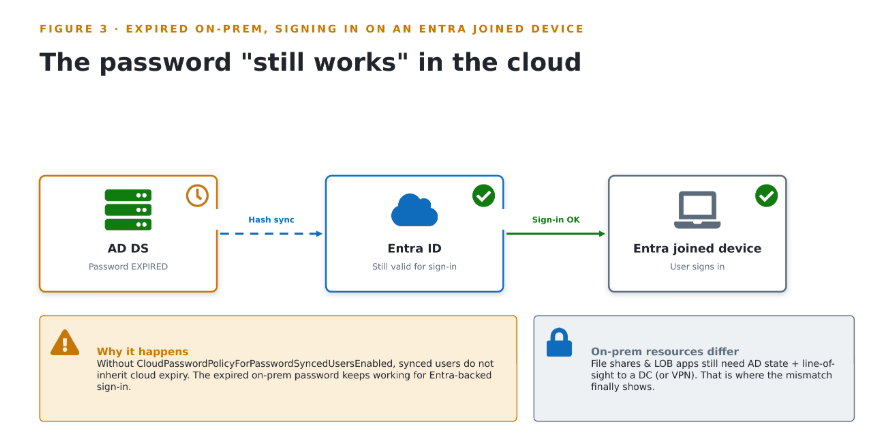
Figure 3. Without CloudPasswordPolicyForPasswordSyncedUsersEnabled, a password that has expired in AD DS can still sign in to cloud services from a Microsoft Entra joined device.
5. Why users can appear “fine” while IT sees an expired password
Once the user signs in to a Microsoft Entra joined Windows device, the device holds a PRT, and background refresh attempts occur periodically. In parallel, when a password change is synchronized while a user is already signed in to cloud services, the current session is not immediately interrupted. Password state changes do not always translate into immediate user disruption.
This explains a common hybrid helpdesk conversation: the user is already signed in, still has working tokens, still has desktop access, and perhaps still opens cloud apps successfully. The failure only appears when a fresh reauthentication is required or when access shifts toward resources that rely on on-premises AD state and connectivity. Without that mental model, password-expiry incidents in hybrid identity look random or inconsistent.
6. Making password expiration behave predictably in hybrid identity
If the organization still enforces password expiration, the cleanest way to reduce confusion is to enable CloudPasswordPolicyForPasswordSyncedUsersEnabled. The Microsoft Entra password policy does not apply to synchronized users unless that feature is enabled.
That feature becomes far more useful when paired with password writeback. Password writeback allows password changes and resets performed through Microsoft Entra to be written back to AD DS in real time, and the new password is validated against on-premises requirements — history, complexity, age, and custom password filters — before it is accepted. The cloud experience stays convenient while AD DS remains authoritative for synchronized users.
The practical takeaway: in a hybrid organization, do not assume password hash sync alone will produce consistent password-expiry behavior. If you want cloud sign-ins to honor password aging for synced users, configure it intentionally and align the flow with password writeback.
7. Admin resets a password in AD and selects “must change at next logon”
This is the second major trap in hybrid identity. In a traditional domain-joined environment, resetting the password in AD and checking “User must change password at next logon” works exactly as expected because AD controls the next sign-in. In hybrid identity, that same checkbox can prevent users from signing in properly to Microsoft 365, Microsoft Entra, or Intune unless the environment is configured for a matching cloud-side experience.
The reason is that the classic AD behavior does not automatically translate to Microsoft Entra sign-in by default. Temporary passwords are not synchronized for cloud use in the way many admins assume, and supporting the “must change at next sign-in” behavior for synchronized users requires the ForcePasswordChangeOnLogOn feature. Microsoft Entra Connect exposes this as UserForcePasswordChangeOnLogonEnabled.
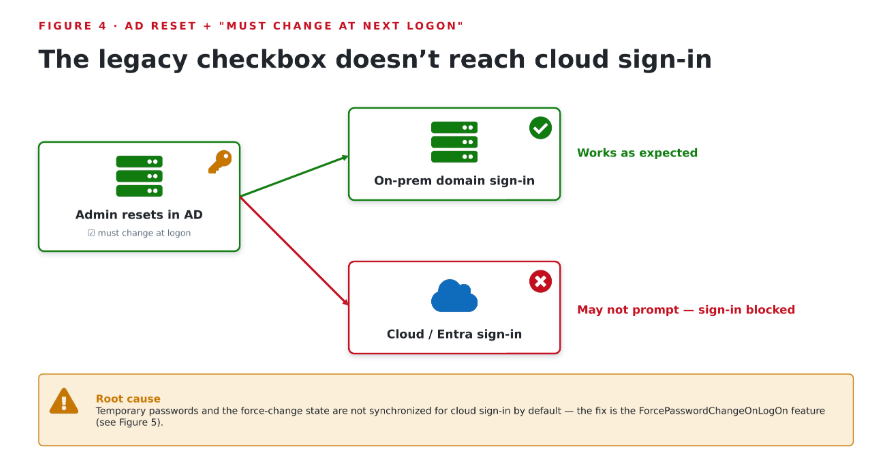
Figure 4. By default the legacy AD checkbox does not flow to cloud sign-in: temporary passwords and the force-change state are not synchronized without ForcePasswordChangeOnLogOn.
If ForcePasswordChangeOnLogOn is enabled, Microsoft Entra can receive the force-change-at-next-sign-in state. Even then, the correct end-to-end design pairs it with password writeback — otherwise the user may be prompted in the cloud but the new password will not complete the full authoritative lifecycle back into AD DS.
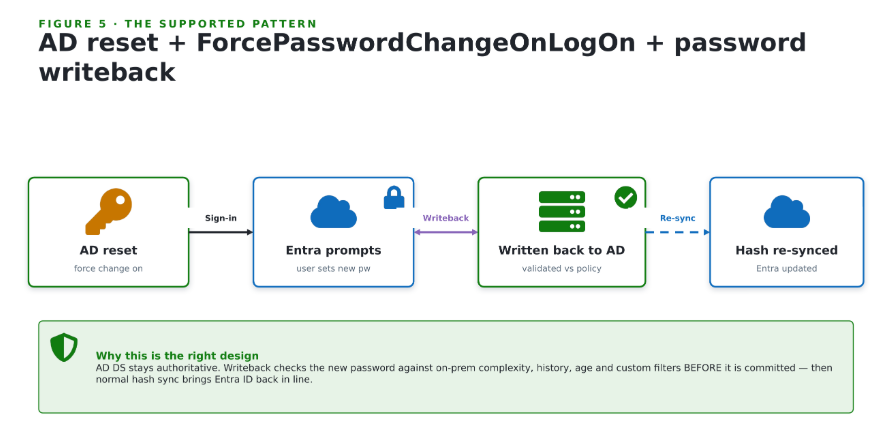
Figure 5. The supported pattern — AD reset + ForcePasswordChangeOnLogOn + password writeback — validates the new password against on-prem policy, then re-syncs it to Microsoft Entra ID.
8. What if the admin resets the password in the Microsoft Entra admin center instead?
For remote users and cloud-first device fleets this is often the cleaner helpdesk workflow — but only if the hybrid design supports it. If the user’s source of authority is Windows Server Active Directory, an admin can reset the password from the Microsoft Entra admin center only when password writeback is enabled and the domain is managed. Password reset through this cloud admin path is not supported for federated domains; in that case the password must be changed in on-premises Active Directory.
When the flow is supported, Microsoft Entra can generate a temporary password, require the user to change it at next sign-in, and write the resulting password back to AD DS. One detail often surprises admins: the temporary password itself does not automatically expire, even though the user is still required to change it during sign-in.
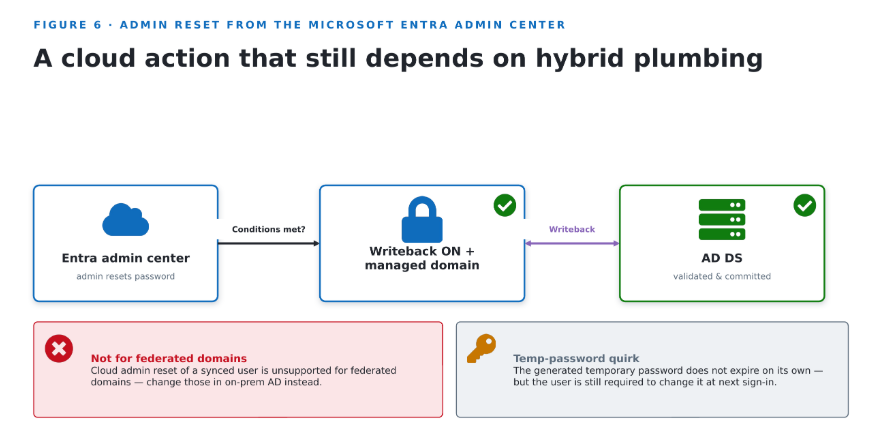
Figure 6. Resetting from the Microsoft Entra admin center works for synced users only with password writeback and a managed domain — and is not supported for federated domains.
9. Password writeback: the feature that makes hybrid password operations manageable
If one hybrid password feature changes the operating model the most, it is password writeback. It takes password changes and resets performed in Microsoft Entra and writes them back to on-premises AD DS in real time. It works with Password Hash Sync, Pass-through Authentication, and AD FS environments, validates the password against on-premises rules before committing it, and functions outbound over TCP 443 without requiring inbound firewall openings.
For organizations with remote or mobile users on Microsoft Entra joined devices, this is the difference between a fragmented support process and a workable modern identity flow. Without writeback, cloud-side reset experiences and AD-side authority diverge. With writeback, admins can support users through modern portals while still preserving AD DS as the authoritative system for synchronized accounts.
10. What administrators should change in their operating model
The biggest mindset shift: in on-premises AD, password handling is mostly a directory operation; in hybrid identity, it becomes an identity-flow design operation. Administrators should stop asking only “did the password reset in AD?” and start asking five design questions:
- Which system validates the next sign-in? AD DS, Microsoft Entra ID, Pass-through Authentication, or federation?
- What device state is the user on? Domain joined, hybrid joined, or Microsoft Entra joined?
- Is password writeback enabled and tested?
- Is CloudPasswordPolicyForPasswordSyncedUsersEnabled enabled?
- Is ForcePasswordChangeOnLogOn enabled if AD-based first-sign-in password changes must work through cloud sign-in paths?
If those answers are not clear, the organization does not yet have a hybrid password strategy — it only has synchronization.
Practical recommendations for administrators
- Keep AD DS as the source of authority for synchronized users.
- Enable password writeback before relying on cloud-based password change or reset experiences.
- If password aging is still required, enable CloudPasswordPolicyForPasswordSyncedUsersEnabled and align expiration behavior intentionally.
- If you expect “must change password at next logon” to work for Microsoft Entra sign-in, enable ForcePasswordChangeOnLogOn and test it end to end.
- Test on all relevant device states: domain joined, hybrid joined, and Microsoft Entra joined. Flows that behave as expected on one device type may not feel identical on another.
- Do not assume Password Hash Sync alone delivers policy parity — it synchronizes credential material, not every enforcement event or sign-in-time decision.
Conclusion
Hybrid identity does not remove password-management complexity; it moves that complexity into architecture. Authentication can now happen through Microsoft Entra ID, users may sign in on Microsoft Entra joined devices, and password changes may originate in the cloud while AD DS still owns the account. That is why password design in hybrid identity must be intentional.
The biggest lesson is simple: synchronization alone does not create policy parity. If you want on-premises password expiration to matter in the cloud, you must configure it. If you want “must change password at next logon” to work beyond classic domain-joined sign-in, you must configure it. And if you want the helpdesk and self-service experience to work for remote users, you need password writeback and tested hybrid password flows.
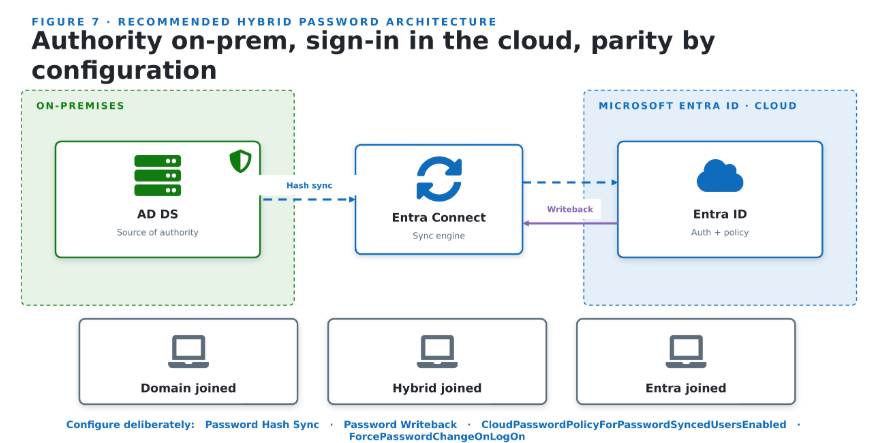
Figure 7. Recommended design: AD DS stays authoritative, Microsoft Entra ID handles modern sign-in, and the four hybrid password features are enabled intentionally.